Reference
This Reference section provides comprehensive definitions, quick-reference guides, and visual indicators used throughout the EPMware system. Use this section to quickly look up field definitions and understand status indicators.
The reference materials are organized into logical sections covering request header field definitions and status icons used throughout the system
Field Glossary
Comprehensive definitions of all fields and terms used throughout the EPMware system, organized by functional area.
Request Header Fields
- Request ID: Unique system generated number that assigns a Request ID number to the request
- Requested By: The LDAP of the Requestor
- Request Date: Date the Request was created by the original Requestor
- Due Date: Due date assigned by the Requestor
- Description: A description of the Request entered by the Requestor
- Request Status: Identifies the status of the Request: Open, Pending, Deployed, or Completed
- Priority: Assigns a priority to the Request and filters the Workflow drop down list
- Workflow: Lists Workflows to which the Requestor has security access. The Security Groups assigned to the Workflow via Tasks will filter the Applications and Dimensions based on the Security Groups
- Workflow Status: This is a read only field that identifies the Status of the Workflow: Pending Submission, Submitted, Pending Review, Pending Approval, Reviewed or Completed
- UD1: This is a user defined field defined by the Administrator
- UD2: This is a user defined field defined by the Administrator
- UD3: This is a user defined field defined by the Administrator
Deployment Fields
- Deployment ID: Unique ID assigned to the Deployment
- Name: Name of Deployment as defined on Manager Tab
- Application: Application being deployed
- Start Time: The date and time that the Deployment instance began running
- End Time: The date and time that the Deployment instance completed
- Status: Will display either Running or Completed
- Message: Deployment progress messages
- Files: Click to download the deployment files
- Log: Will display the log file pertaining to this deployment instance
Workflow Terminology
- Stage: A phase in the workflow process (Review, Approval, Validation, Deployment)
- Task: Individual actions within a workflow stage
- Approver: User authorized to approve requests at a specific stage
- Reviewer: User authorized to review and validate requests
- Recall: Action to return a request to a previous workflow stage
Application Terms
- Dimension: Organizational structure for metadata (Account, Entity, Product, etc.)
- Hierarchy: Tree structure showing parent-child relationships of members
- Member: Individual element within a dimension (specific account, entity, product)
- Property: Attribute or characteristic of a member (alias, description, data type)
- Shared Member: Member that exists in multiple locations within the same dimension
- Primary Member: Original location of a shared member
- Parent Member: Member that has children in the hierarchy
- Child Member: Member that reports to a parent in the hierarchy
- Sibling Members: Members at the same level under the same parent
Status Icons
Visual indicators used throughout EPMware to show the current state of requests, deployments, and system processes.
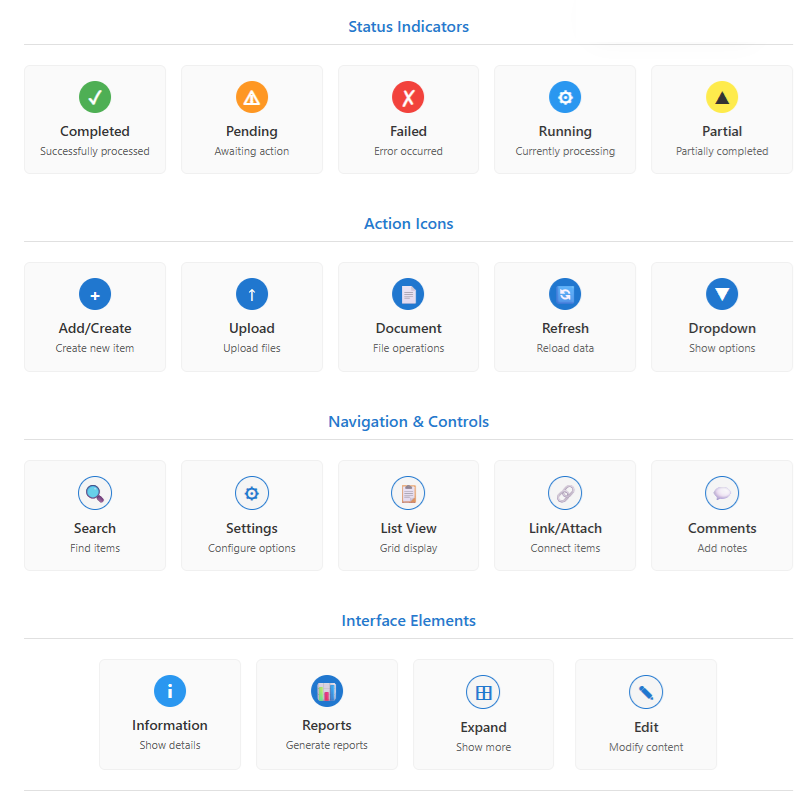
Complete set of status icons used throughout EPMware
Request Status Icons
 Completed - Request has been successfully processed and deployed
 Pending - Request is waiting for action (review, approval, or deployment)
 Failed - Request has encountered an error and requires intervention
 Running - Request is currently being processed
 Partial - Some items completed successfully, others failed
Member Status Indicators
- Red Font: Members pending deployment (changes not yet live)
- Black Font: Members that are "live" in the target application
Workflow Status Indicators
- Pending Submission: Request created but not yet submitted to workflow
- Submitted: Request entered into workflow process
- Pending Review: Request awaiting reviewer action
- Pending Approval: Request awaiting approver action
- Reviewed: Review stage completed successfully
- Approved: Approval stage completed successfully
- Validated: Validation stage completed successfully
- Deployed: Request successfully deployed to target systems
- Completed: All workflow stages finished successfully
Quick Reference Tables
Request Priorities
| Priority | Description | Workflow Impact |
|---|---|---|
| High | Urgent requests requiring immediate attention | Expedited approval process |
| Medium | Standard business requests | Normal approval timeline |
| Low | Non-critical requests | Extended approval timeline acceptable |
Export Formats
| Format | Best Used For | File Extension |
|---|---|---|
| HTML | Web-based report format suitable for viewing and printing | .html |
| CSV | Data import and integration | .csv |
Common Error Messages
| Error | Cause | Resolution |
|---|---|---|
| "Member is locked" | Another user editing member | Wait or contact administrator |
| "Invalid property value" | Data doesn't meet validation rules | Check property requirements |
| "Insufficient permissions" | User lacks required access | Contact administrator for access |
| "Deployment failed" | Target system unavailable | Check system status and retry |